Your help center lives in Notion, and you want it on help.yourdomain.com rather than a notion.site link. A Notion custom domain can be set up three ways: with Notion Sites, with a site builder like Super, or with a help center platform like Notiondesk. Each route is covered below with its cost, the exact DNS records to add and what your customers see once the domain is live.
Table of contents
- Notion custom domain options compared
- Route 1: Notion Sites, the native add-on
- Route 2: Super, for a full website built on Notion
- Route 3: Notiondesk, built for a Notion help center
- Is there a free Notion custom domain?
- Why Notiondesk is the best way to put a Notion help center on your domain
Notion custom domain options compared
Prices, DNS records and limits as each provider publishes them in October 2026.
| Notiondesk (help center tool) | Notion Sites | Super (site builder) | |
|---|---|---|---|
| Price for a custom domain | From $15 a month billed yearly, custom domain and SSL included | $10 a month per domain ($8 billed yearly) on top of a paid Notion plan | From $16 a month (Personal site), $144 a year billed yearly |
| Notion plan needed | Any; your pages can stay private | A paid Notion plan | Any; Super reads a public Notion page |
Subdomain (help.yourdomain.com) | Yes | Yes | Yes |
Subpath (yourdomain.com/help) | Yes | No | No |
| DNS records | One CNAME to cname.notiondesk.help | CNAME to external.notion.site. plus a TXT record | A 76.76.21.21 on @ and CNAME cname.super.so, or one CNAME for a subdomain |
| AI answers from your help articles | Yes, the AI Chatbot answers through AI Search | Not built in | Not built in |
| Help widget inside your product | Yes, Notiondesk Messenger | Not built in | Not built in |
| Beyond the domain | AI answers from your articles, Notiondesk Messenger inside your product and MCP Search for AI assistants (Pro and up), plus article search and suggestions, collections, content rating, SEO settings and free SSL on every plan; contact form, analytics and 2 languages from Pro | A published web page: no home page of collections, article suggestions or contact form | A website builder: advanced search and multi-language sites only from the $28 Pro site plan |
The domain is the easy part. What counts is what customers find when they get there: a help center they can search and browse, or a long page they have to scroll.
Route 1: Notion Sites, the native add-on
Notion Sites is Notion's own publishing. It can serve a published page on a domain you own, as long as you are on a paid Notion plan. Notion does not sell domains, so buy yours at a registrar first.
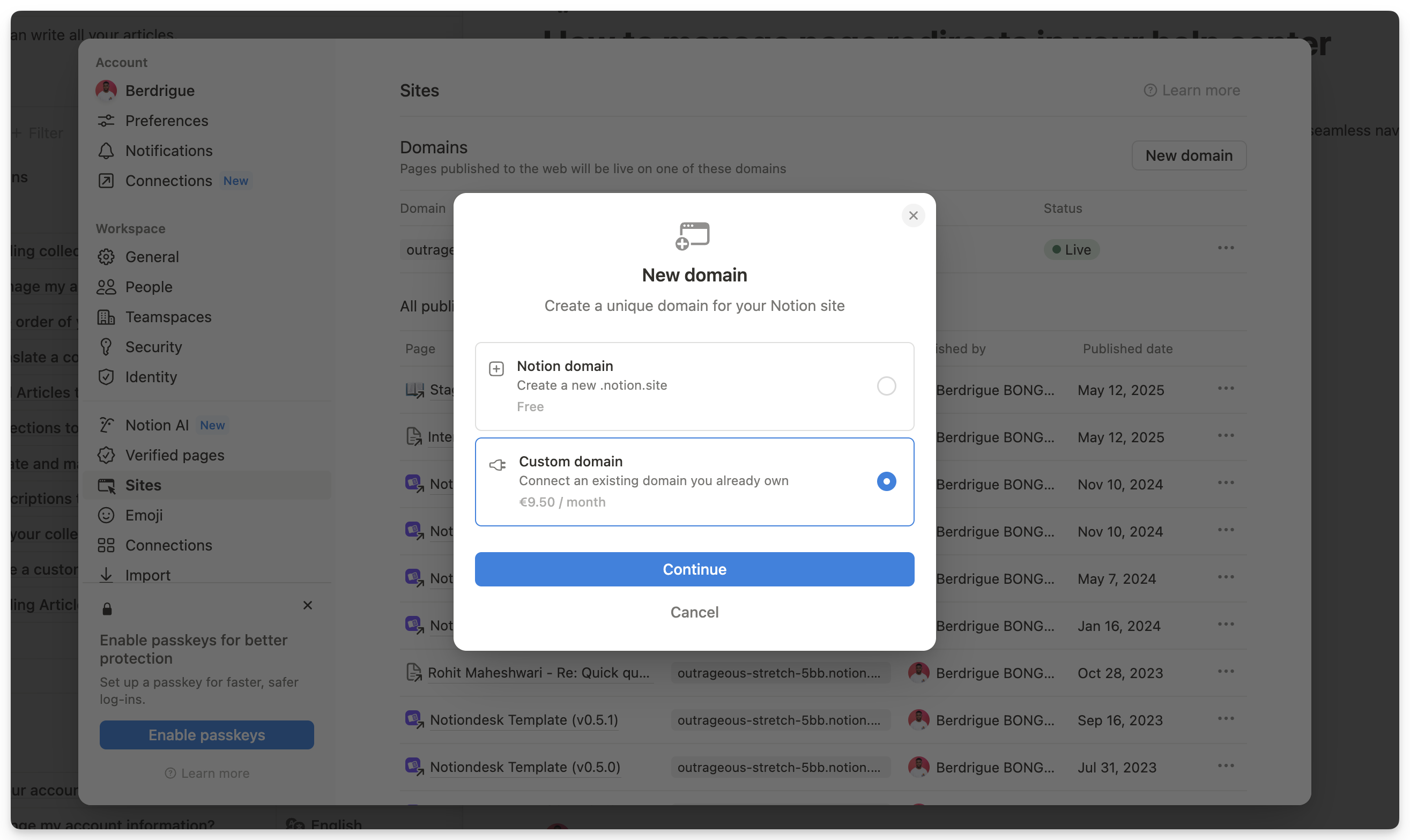
The steps, from Notion's custom domain help page:
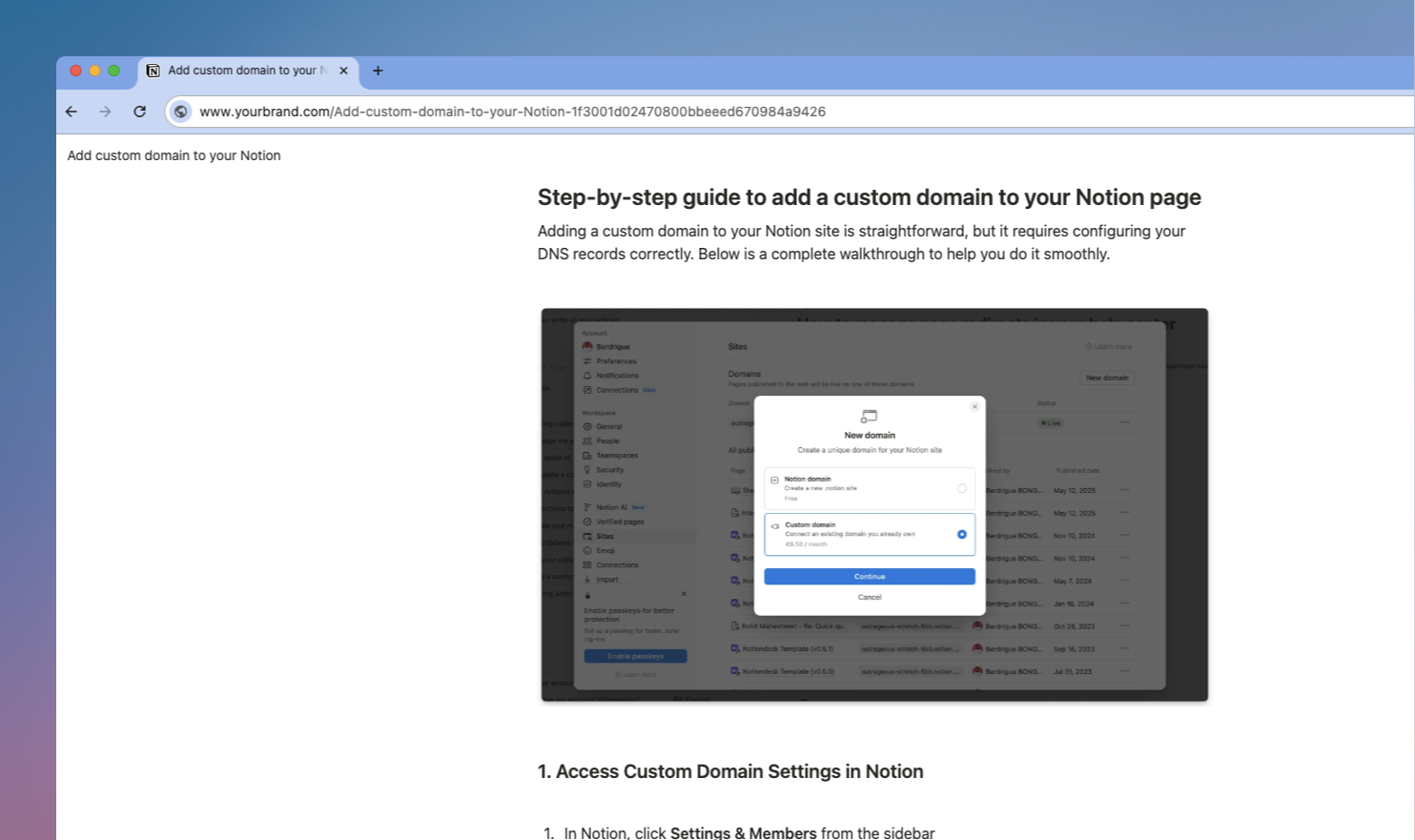
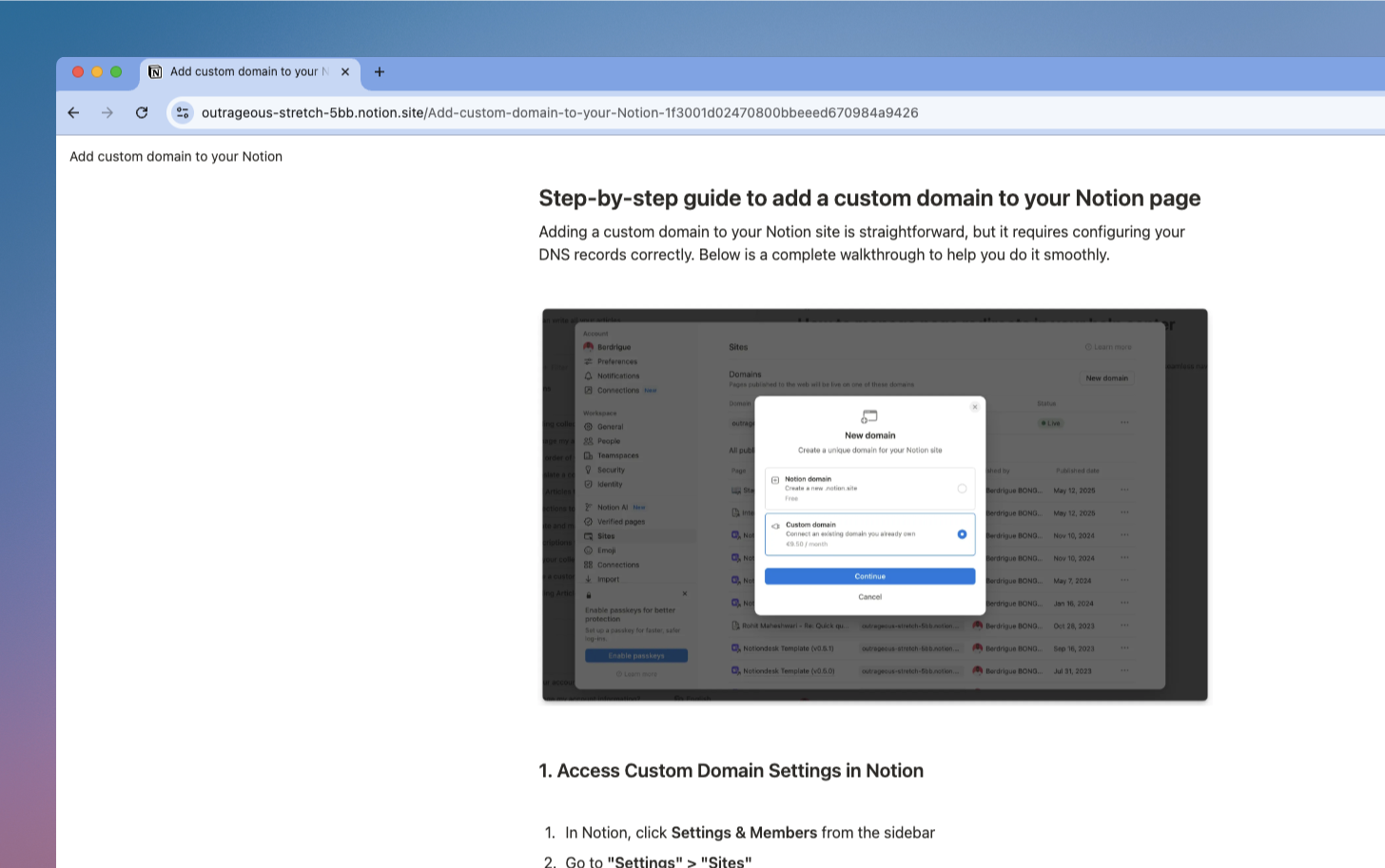
- In Notion, open Settings in the sidebar, then Sites.
- Next to Domains, select New domain.
- Select Custom domain, then Continue. Notion asks for a payment method for the add-on if it has none on file.
- Enter the domain with a subdomain, for example
help.yourdomain.com, then Continue.
- At your DNS provider, add a CNAME record for that subdomain with the target
external.notion.site.(keep the period at the end).
- Add the TXT record Notion shows you. Its name looks like
_notion-dcv.help, and its value is a code unique to your domain.
- Back in Notion, select Verify.
For help.yourdomain.com, you end up with two records:
| Type | Name | Value |
|---|---|---|
| CNAME | help | external.notion.site. |
| TXT | _notion-dcv.help | the code Notion gives you |
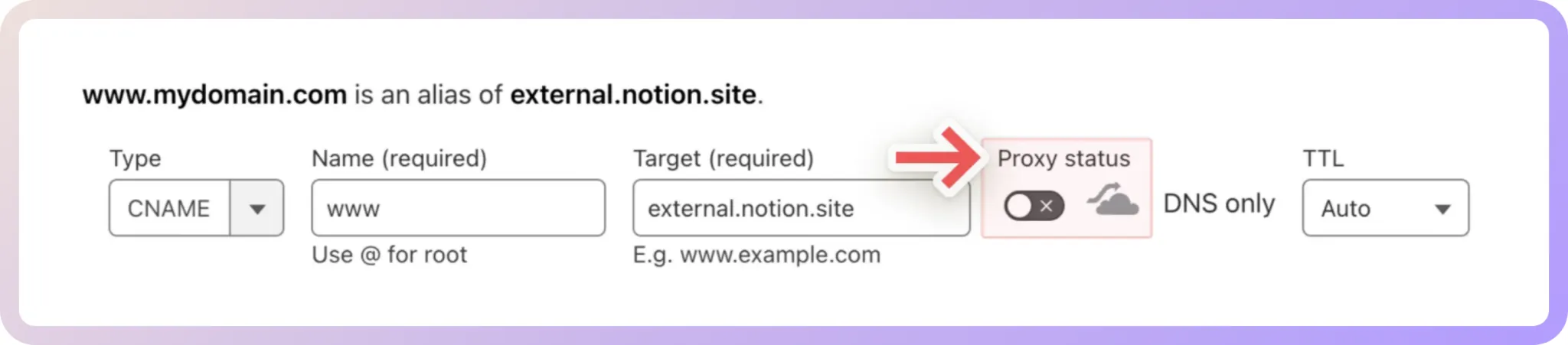
The catch is the root domain. Notion won't serve yourdomain.com directly. Its workaround is to connect www.yourdomain.com and redirect the root to it at your DNS provider. Each domain is billed as its own add-on.
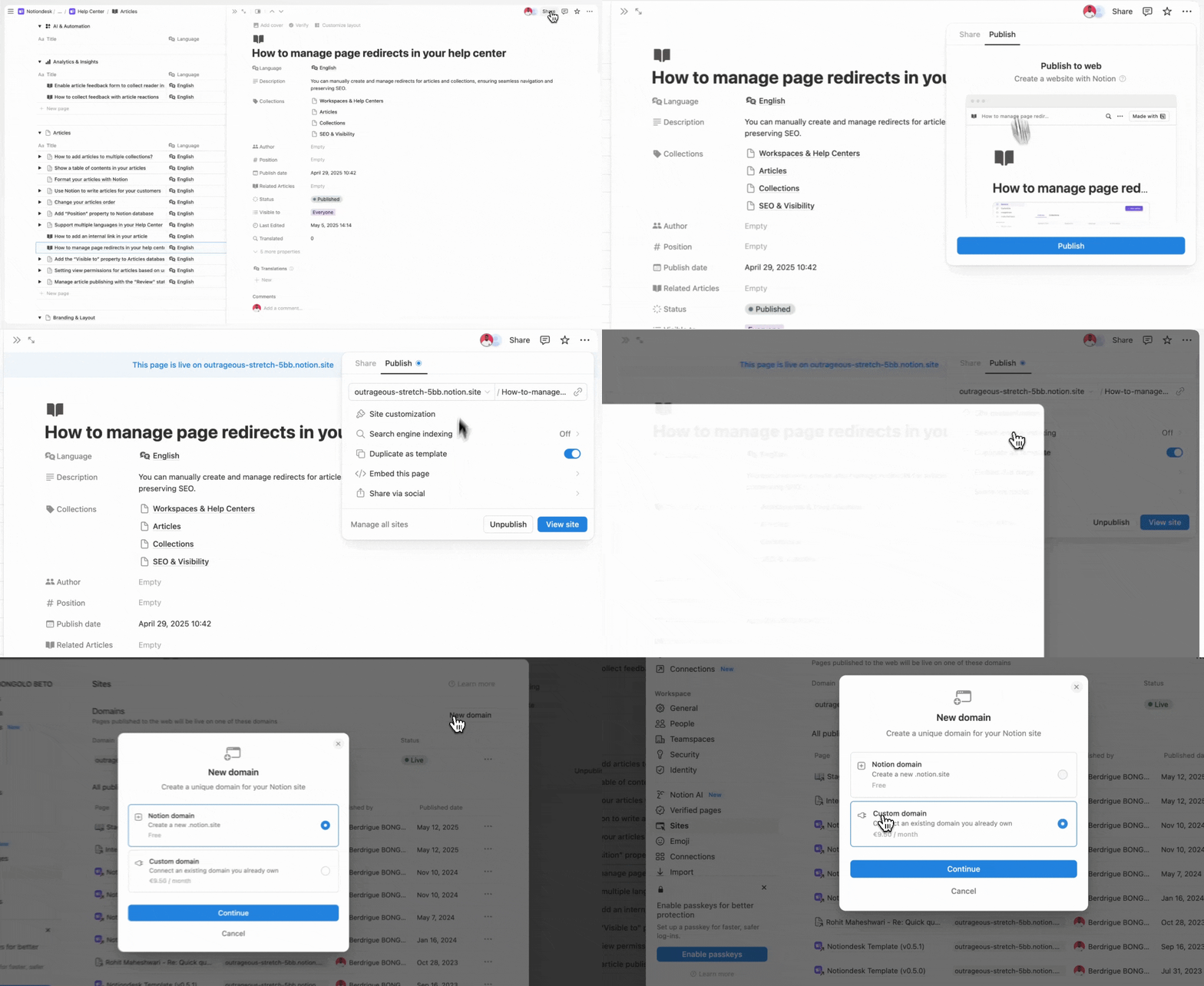
Where Notion Sites falls short for a help center
Notion Sites puts a page on your domain, and that is where it stops. You pay for a Notion plan plus $10 a month per domain, the root domain needs a redirect, and customers still land on a web page instead of a help center: no home page of collections, no article suggestions as they type, no contact form. Notiondesk's Starter plan is $15 a month billed yearly with the custom domain and SSL included, no add-on to buy.
Route 2: Super, for a full website built on Notion
Super reads a public Notion page and serves it as a website from its own servers. You keep writing in Notion, and Super takes care of the design and the domain.
The records, from Super's custom domain docs:
| Domain | Type | Name | Value |
|---|---|---|---|
Root, yourdomain.com | A | @ | 76.76.21.21 |
Root, yourdomain.com | CNAME | www | cname.super.so |
Subdomain, help.yourdomain.com | CNAME | help | cname.super.so |
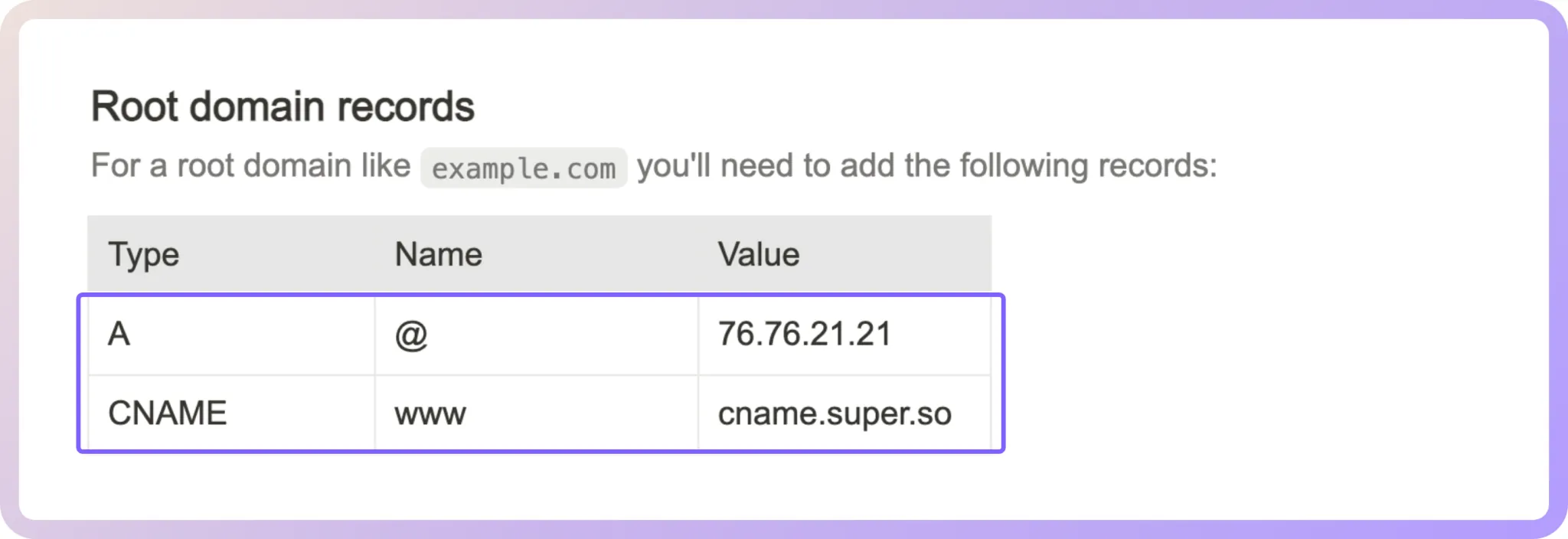
Clear out any old A, AAAA or CNAME records on those names before you add these. On Cloudflare, Super wants the proxy off (DNS only) and a CNAME on @ pointing to cname.super.so in place of the A record. Super says propagation can take up to 24 hours.
Super's free plan keeps you on a super.site address. A custom domain starts with the Personal site plan, $16 a month or $144 a year (Super pricing).
Where Super falls short for a help center
Super is a website builder first. A custom domain starts at $16 a month, and the advanced search and multi-language sites a help center needs sit on the Pro site plan at $28 a month. Your Notion pages also have to be public for Super to read them. Notiondesk includes article search and a custom domain on every plan, lets your Notion pages stay private, and is built around help center needs: collections, article suggestions and content rating on every plan, plus a contact form and analytics from Pro.
Route 3: Notiondesk, built for a Notion help center
Notiondesk connects to your Notion workspace, pulls your pages in and serves them as a help center, with a home page of collections, search and a way for customers to reach you. Your pages stay in Notion and don't need to be public. Our own help center, help.notiondesk.so, runs this way.
The domain takes a single record:
| Type | Name | Value |
|---|---|---|
| CNAME | help | cname.notiondesk.help |
Then paste help.yourdomain.com into the Custom domain field of your General settings and save. The SSL certificate is free and generated for you, so the help center opens on https:// with nothing else to buy. Allow 5 to 60 minutes for the CNAME to propagate, depending on your DNS provider. The Notiondesk custom domain setup guide has links for the most common DNS providers.
Prefer a subpath on your main site?
This is where Notiondesk pulls further ahead. Notiondesk can serve your help center under a path on your main site, such as /help or /docs. Turn on Subpath under Settings > General > Domains, then follow the instructions for your host: Cloudflare, Vercel / Next.js, AWS CloudFront, Nginx or Caddy (subpath hosting guide). Neither Notion Sites nor Super offers a subpath.
Beyond static pages: AI answers, Messenger and MCP
Your customers arrive with a question, not a reading list. A published page waits to be scrolled. Notiondesk answers back.
- AI answers from your Notion docs. The Notiondesk AI Chatbot reads your published articles and answers visitors in plain language through AI Search, with links to the articles behind each answer. It stays up to date with your Notion articles.
- Messenger inside your product. Notiondesk Messenger puts help center search, articles, AI conversations, a contact option and your changelog in one widget on your website or app. A JavaScript snippet installs it, and an SDK covers React, Next.js, Vue and Nuxt.
- MCP for AI assistants. Customers who ask ChatGPT or Claude about your product can get answers from your real docs. MCP Search lets those assistants search and read your published help center, read-only, on Pro and up. Workspace MCP also lets your team check analytics, article feedback and sync status from the same assistants.
- A changelog customers can follow. Publish product updates on a changelog page inside your help center and let customers subscribe by email.
For more on how AI tools read documentation, see our guide to optimizing Notion docs for AI search.
The help center basics, on every plan
- Search that helps. Article search and article suggestions, so customers find the answer while they type.
- Your brand. Your logo, colors, header and footer links, plus your own HTML and CSS if you want full control of the look.
- SEO. Help center pages optimized for Google and Bing, with titles and descriptions you set.
- Structure. Collections and sub-collections as deep as you need, and one article can sit in several collections.
- Feedback. Content rating on every article, with analytics and a contact form from Pro.
- Languages. 1 on Starter, 2 on Pro with automated translation, unlimited on Enterprise.
Every limit by plan is on the Notiondesk pricing page.
Is there a free Notion custom domain?
No. Notion only offers custom domains on paid plans, through the paid add-on. Every free option keeps a vendor subdomain: yourname.notion.site on Notion's Free plan, or yourname.super.site on Super's. To test a custom domain before paying, Notiondesk's 7-day trial needs no credit card, and every plan includes a custom domain with free SSL.
Why Notiondesk is the best way to put a Notion help center on your domain
Notion Sites and Super both put Notion content on your domain. Notiondesk is the one built to turn that content into a help center, which is why it is the route we recommend for a customer help center.
Add one CNAME record and you are live on help.yourdomain.com with free SSL, or use a subpath and keep the help center at yourdomain.com/help. Customers search, browse your collections and reach you when the answer is missing. They also get AI answers from your Notion docs, help inside your product through Messenger, and your documentation inside ChatGPT or Claude through MCP Search. Your team keeps writing in Notion, exactly as it does today.
Still building the help center itself? Start with how to use Notion as a help center, then pick a plan on the Notiondesk pricing page.

help.yourdomain.com at cname.notiondesk.help, then add AI answers, Messenger and MCP on the plan that fits. Start your 7-day free trial, no credit card required.